Tinkering after hours · Prague, CET業務後の趣味開発 · プラハ (CET)

I build functional Axis prototypes in my free time so you can test your wild ideas fast.

空き時間に、動く Axis プロトタイプをつくります。大胆なアイデアを、すぐ試せるように。

Have a wild ACAP or VAPIX concept? After 7+ years of working with Axis hardware, pushing these cameras to their limits has become my favourite after-work obsession. Using AI-assisted coding, I can help you hack together a functional edge prototype in days — just to see if your idea actually works, before you go all-in.

風変わりな ACAP や VAPIX のアイデアはありませんか。Axis のハードウェアに携わって7年以上、カメラを限界まで使い倒すことが、いつのまにか仕事終わりの一番の楽しみになりました。AI 支援のコーディングを使えば、動くエッジプロトタイプを数日で組み上げられます。本格的に投資する前に、そのアイデアが本当に成立するのか確かめてみませんか。

Illustrated portrait of Pavel Kotyza holding a Canon camera in front of the Las Vegas sign
Pavel Kotyza
Axis Communications — Axis Certified Professional

Axis Certified Professional

Axis Communications' advanced credential in network video — awarded on passing the Axis Network Video Exam and renewed every three years. It means the person specifying your system knows the products, the protocols and the failure modes, not just the brochure.

Axis Communications のネットワークビデオ上級認定です。Axis Network Video Exam の合格者に付与され、3年ごとに更新されます。カタログの内容だけでなく、製品・プロトコル・障害の起き方まで理解した人間がシステムを設計する、ということです。

Verify this certification on axis.com →axis.com で認定を確認する →
23
Public repositories公開リポジトリ
15
Axis camera projectsAxis カメラ関連プロジェクト
ACAP
Native SDK · ARTPEC-7/8/9Native SDK · ARTPEC-7/8/9
AI+
Vibecoded · proven on hardware趣味開発 · 実機で検証済み
01 / METHOD01 / 手法

Why I started building

なぜつくり始めたのか

I sit between two sides: sales for CamStreamer and partnership with Axis on one, end users and resellers on the other. The question I hear constantly is whether some specific thing is possible — and “let me check with development” is a slow, unsatisfying answer. So I started building the answer instead, mostly on evenings and weekends. I vibecode: Claude writes most of the code, I bring the domain knowledge that separates a fun demo from something that still works on a pole in February.

私は二つの立場のあいだにいます。ひとつは CamStreamer の営業と Axis とのパートナーシップ、もうひとつはエンドユーザーとリセラーです。そこで絶えず聞かれるのが「これは実現できますか」という問いで、「開発に確認します」という返事は遅くて物足りない。だから、答えのほうをつくることにしました。作業はたいてい平日の夜と週末です。私はバイブコーディングをします。コードの大半は Claude が書き、私は、楽しいデモと2月の支柱の上でも動き続けるものとを分ける知識を持ち込みます。

What I know

知っていること

VAPIX, ACAP, the CamStreamer suite and the AXIS hardware underneath. Seven-plus years inside the partner ecosystem: what the DLPU will sustain, where firmware bites, which requirement is a product and which is a fifty-line script.

VAPIX、ACAP、CamStreamer スイート、そしてその下で動く AXIS のハードウェア。パートナーエコシステムでの7年以上から、DLPU がどこまで耐えるか、ファームウェアのどこで詰まるか、どの要件が製品でどれが50行のスクリプトで足りるかがわかります。

How it gets built

どうつくるか

We jump on a call and geek out over your idea, then I go away and hack it together — Claude Code doing the typing, me deciding what actually runs on the device and catching what a model confidently gets wrong.

まず通話で、アイデアについて一緒に盛り上がります。そのあと私が持ち帰って組み上げます。タイピングは Claude Code、デバイス上で実際に何を動かすかの判断と、モデルが自信満々に間違える箇所を見つけるのは私の役目です。

What you get out of it

何が手に入るか

Something running on a real camera that you can watch, film, or put in front of a customer. It turns “we think so” into a yes or a no — and tells you early whether the idea is worth building properly at all.

実機のカメラで動いているもの。見て、撮影して、顧客の前に出せます。「たぶんできます」が「できる」か「できない」に変わり、そもそも本格的につくる価値があるのかが早い段階でわかります。

02 / SERVICES02 / サービス

What people bring me

よく持ち込まれる相談

Small, well-scoped things with something you can actually run at the end — an installable .eap, a CamScripter package, or a documented integration you can hand to your own team.

小さく、範囲のはっきりした仕事。最後には実際に動かせるものが残ります。インストール可能な .eap、CamScripter パッケージ、あるいは自社のチームに引き渡せる形で文書化された連携です。

Proof of concept, fast

短期間で PoC を

The one people come for. Describe the thing you're not sure is possible and I'll build a working version on a real camera — usually inside a week or two of evenings, long before anyone has to budget a development project.

一番多い依頼です。実現できるか自信がないことを説明してください。実機のカメラで動くバージョンをつくります。たいていは1〜2週間の夜の作業で、誰かが開発予算を組むよりずっと前に。

Custom ACAP applications

カスタム ACAP アプリケーション

Native AXIS OS 11/12 apps built with the ACAP Native SDK — Node.js runtime bundled, web settings UI included, signed and packaged as a single .eap.

ACAP Native SDK でつくる AXIS OS 11/12 ネイティブアプリ。Node.js ランタイム同梱、Web 設定 UI 付き、署名済みの単一 .eap として提供します。

CamScripter & CamOverlay work

CamScripter / CamOverlay

Live data burned into the video stream: REST APIs, MQTT, RS-232, sensors, scoreboards, queue counters. Built on the CamStreamer suite, deployed locally or over cloud access.

映像に焼き込むライブデータ。REST API、MQTT、RS-232、各種センサー、スコアボード、待ち行列カウンター。CamStreamer スイート上に構築し、ローカルでもクラウドアクセス経由でも動きます。

Control surfaces & operator tooling

操作機器まわり

One button, one camera action. Stream Deck, Bitfocus Companion, Touch Portal and browser button grids — PTZ presets, stream tally, overlay and view switching, talking straight to the camera with no proxy in between.

ボタン一つでカメラを一動作。Stream Deck、Bitfocus Companion、Touch Portal、ブラウザのボタングリッド。PTZ プリセット、配信タリー、オーバーレイやビューの切り替えを、プロキシを挟まずカメラへ直接。

System integrations & bridges

システム連携とブリッジ

Getting cameras to speak to things they don't ship support for — HomeKit, MCP and AI assistants, weather and aviation feeds, VAPIX event pipelines, third-party APIs in both directions.

本来サポートされていない相手とカメラを話させます。HomeKit、MCP や AI アシスタント、気象・航空データ、VAPIX イベントパイプライン、サードパーティ API を双方向で。

Diagnostics & deployment audits

診断と導入監査

Server-report analysis, ACAP health and resource review, stream and overlay troubleshooting — for fleets that already exist and misbehave under load.

サーバーレポート解析、ACAP の健全性とリソース確認、配信・オーバーレイのトラブルシューティング。すでに稼働していて、負荷時に不調になる環境向けです。

03 / OPEN SOURCE03 / オープンソース

Everything I've published

公開しているものすべて

Twenty-three public repositories, all written by me and all installable. It's also the fastest way to judge whether I'd be useful to you — read the code before you read my CV.

23 の公開リポジトリ。すべて自分で書き、すべてインストールできます。私が役に立つかどうかを判断する一番早い方法でもあります。経歴より先に、コードを読んでください。

Screenshot of AXIS Camera MCP Server
ACAP · TypeScript★ 5

AXIS Camera MCP Server

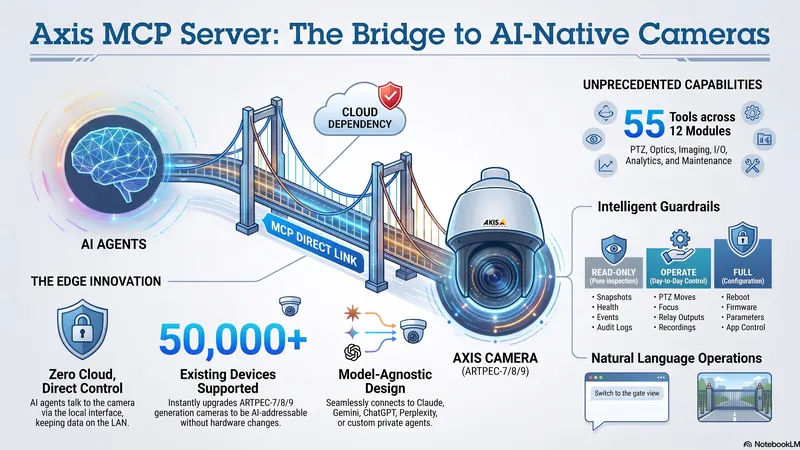
The first on-camera Model Context Protocol server for AXIS cameras. One .eap opens the camera to Claude, Gemini, ChatGPT or Perplexity — snapshots, zoom and focus, event enumeration, ACAP lifecycle. No cloud, no middleware, zero hops.

AXIS カメラ向けとしては初のオンカメラ Model Context Protocol サーバー。.eap 一つで、Claude・Gemini・ChatGPT・Perplexity からカメラを操作できます。スナップショット、ズームとフォーカス、イベント列挙、ACAP のライフサイクル管理まで。クラウドもミドルウェアも不要です。

Node 20ARTPEC-8MCPVAPIX
View repositoryリポジトリを見る
Needle LLM on Axis landing page: a language model that runs inside the camera
ACAP · On-device LLM

Needle LLM on Axis

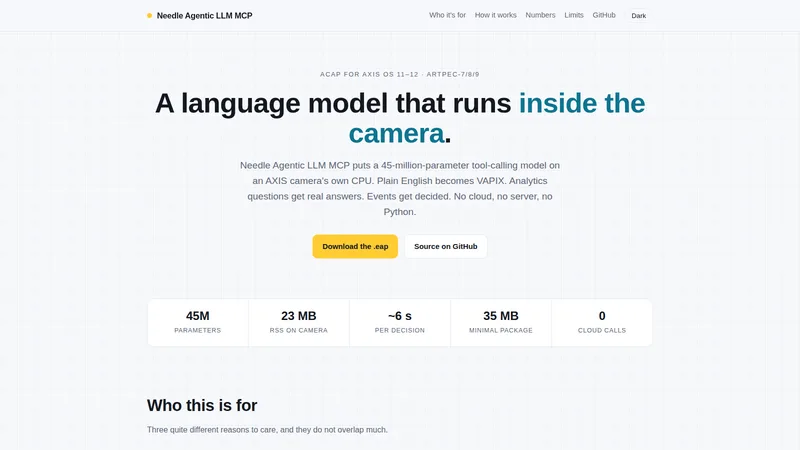
A 45-million-parameter language model running entirely on the camera's own CPU. Plain English becomes VAPIX calls — presets, analytics questions, event decisions — with no cloud, no server and no Python. Built as an extension of the MCP server above, sharing the same 268 VAPIX tools.

カメラ自身の CPU だけで動く4,500万パラメータの言語モデル。平易な英語が VAPIX 呼び出しに変わります — プリセット操作、アナリティクスへの質問、イベントの判断まで。クラウドもサーバーも Python も不要です。上記の MCP サーバーの拡張として構築され、同じ268個の VAPIX ツールを共有します。

Needle 2On-device LLMVAPIXARTPEC-8
View repositoryリポジトリを見る
Gender & Age Detect dashboard showing 19,444 detections split by gender and age band
ACAP · DLPU

Gender & Age Detection

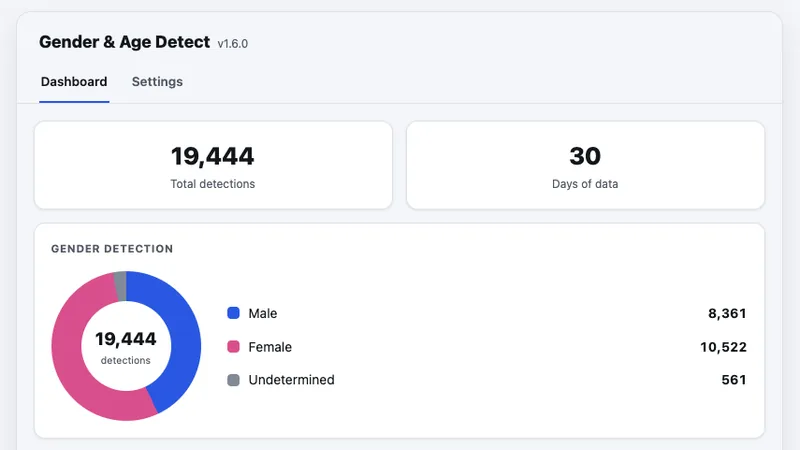
Privacy-first demographic analytics running entirely on the AXIS DLPU — real-time face detection, gender classification and age estimation. No cloud, no video uploads, no images leaving the camera.

AXIS の DLPU 上で完結する、プライバシー優先の属性分析。リアルタイムの顔検出、性別分類、年齢推定を行います。クラウドも映像のアップロードもなく、画像がカメラの外に出ることはありません。

DLPUOn-device AIARTPEC-8
View repositoryリポジトリを見る
Screenshot of Axis ARTPEC8 Hand Gesture Scoreboard Control
ACAP · Computer vision

Hand-Gesture Scoreboard

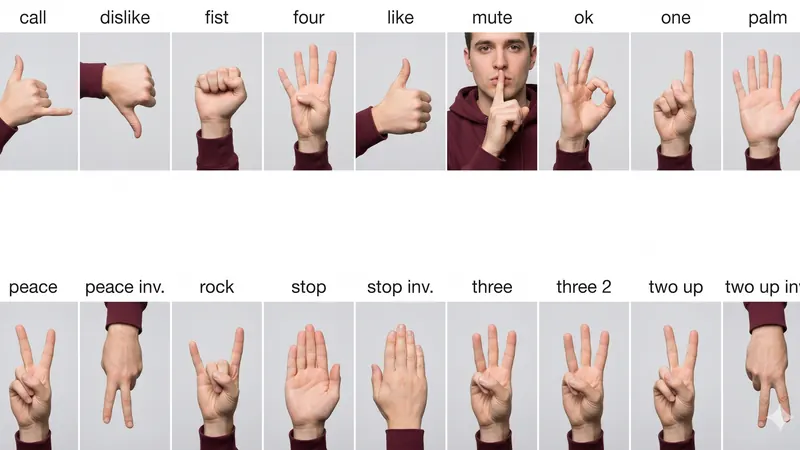
A dual scoreboard driven by hand gestures in front of the lens. Custom TensorFlow Lite model on DetectX, 19 recognised gestures, drag-to-draw home/visitor zones, scores pushed live to CamOverlay.

レンズの前のハンドジェスチャーで動かす、2チーム分のスコアボード。DetectX 上の独自 TensorFlow Lite モデルで19種類のジェスチャーを認識し、ホーム/ビジターのゾーンはドラッグで指定、スコアは CamOverlay へリアルタイムに反映されます。

TensorFlow LiteDetectXCamOverlayMQTT
View repositoryリポジトリを見る
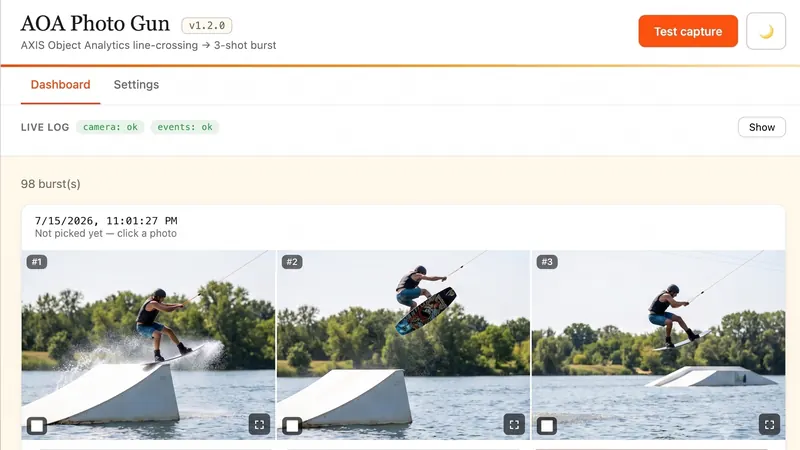
Screenshot of Axis AOA VMD Photo Gun
ACAP · TypeScript · MIT

AOA / VMD Photo Gun

Object Analytics already knows the moment something crosses the line you drew. Photo Gun fires a full-resolution burst the instant it happens, with a dashboard to review and export the frames.

引いたラインを何かが越えた瞬間は、Object Analytics がすでに知っています。Photo Gun はその瞬間にフル解像度の連写を実行し、フレームの確認と書き出しができるダッシュボードを備えます。

Object AnalyticsVMDBurst capture
View repositoryリポジトリを見る
Screenshot of Axis 2 Apple Home Kit
ACAP · HomeKit

Axis → Apple HomeKit

Exposes an AXIS camera as a native HomeKit accessory from the camera itself — no bridge, no hub, no cloud. Zero-transcode H.264 over SRTP, OPUS audio, VMD4 and Object Analytics as motion sensors, QR pairing straight into the Home app.

AXIS カメラを、カメラ自身から HomeKit のネイティブアクセサリとして公開します。ブリッジもハブもクラウドも不要。SRTP 上でトランスコードなしの H.264、OPUS 音声、VMD4 と Object Analytics をモーションセンサーとして扱い、QR コードで Home アプリへ直接ペアリングできます。

HAP-NodeJSSRTPffmpegARTPEC-7/8
View repositoryリポジトリを見る
Screenshot of Axis Load Average Overlay
CamScripter microapp · MIT

Load Average Overlay

Turns the camera's own CPU load into a live, colour-coded overlay on the video — green, amber, red. Spot a device degrading before it drops the stream, with no monitoring infrastructure to stand up.

カメラ自身の CPU 負荷を、映像上の色分けオーバーレイに変えます。緑・オレンジ・赤。監視基盤を用意しなくても、配信が落ちる前に不調の兆候に気づけます。

CamScripterCamOverlayTypeScript
View repositoryリポジトリを見る
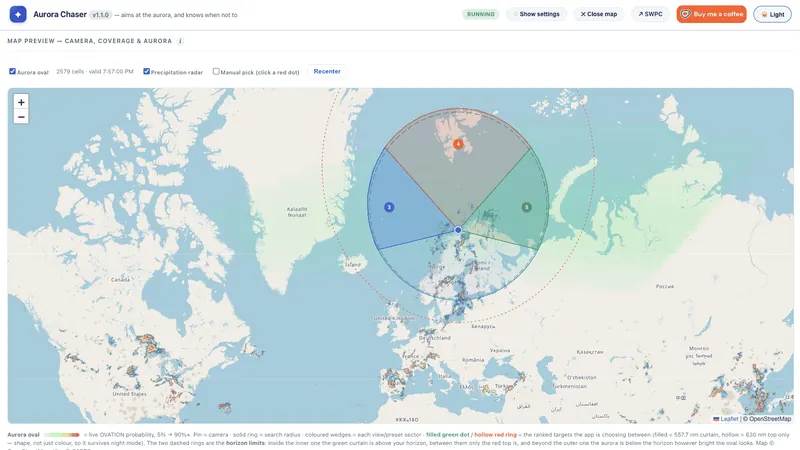
Screenshot of Aurora Chaser for Axis Camera
ACAP · TypeScript

Aurora Chaser

Your PTZ already sits under the sky every night. Aurora Chaser reads the NOAA OVATION nowcast, works out which part of that sky is worth photographing, and turns the lens there.

PTZ カメラは毎晩、すでに空の下にあります。Aurora Chaser は NOAA OVATION のナウキャストを読み、空のどの方向を撮る価値があるかを判断して、レンズをそちらへ向けます。

NOAA OVATIONPTZAstrophotography
View repositoryリポジトリを見る
Screenshot of Storm Chaser for Axis Camera
ACAP · JavaScript · MIT

Storm Chaser

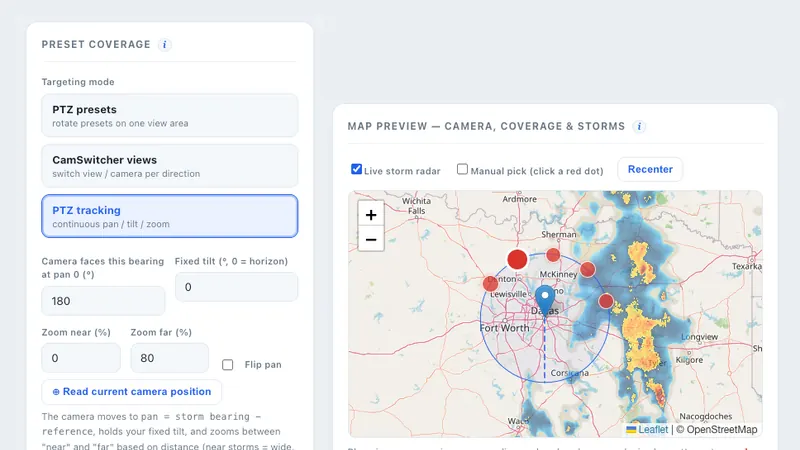
Scans the weather around the camera every few minutes, finds the most active storm cell nearby, works out its bearing and points the camera at it. Unattended severe-weather capture.

数分ごとにカメラ周辺の気象を走査し、最も活発な積乱雲を見つけ、方位を計算してカメラを向けます。無人での荒天撮影用です。

Weather APIPTZAutomation
View repositoryリポジトリを見る
Screenshot of axis cli
CLI · TypeScript

axis-cli

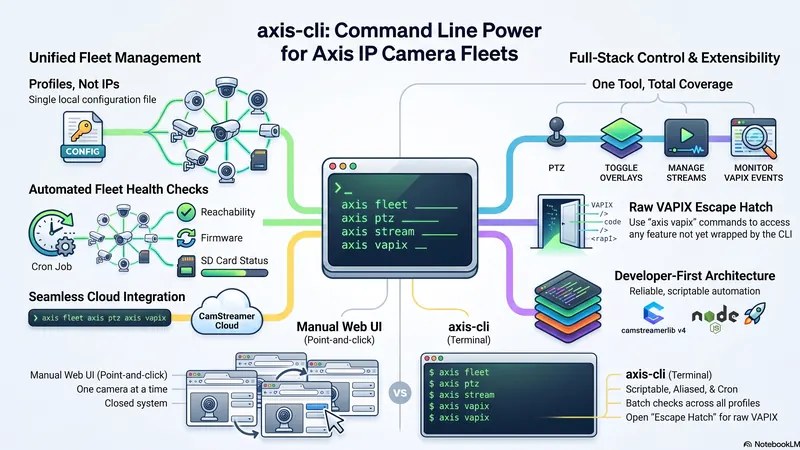
Camera management you can script, alias and automate. Save each camera as a named profile, then check firmware, drive PTZ, toggle overlays and manage streams from the terminal or a cron job.

スクリプト化・エイリアス化・自動化できるカメラ管理。カメラごとに名前付きプロファイルを保存し、ファームウェアの確認、PTZ 操作、オーバーレイの切り替え、配信の管理をターミナルや cron から実行できます。

CLIVAPIXFleet ops
View repositoryリポジトリを見る
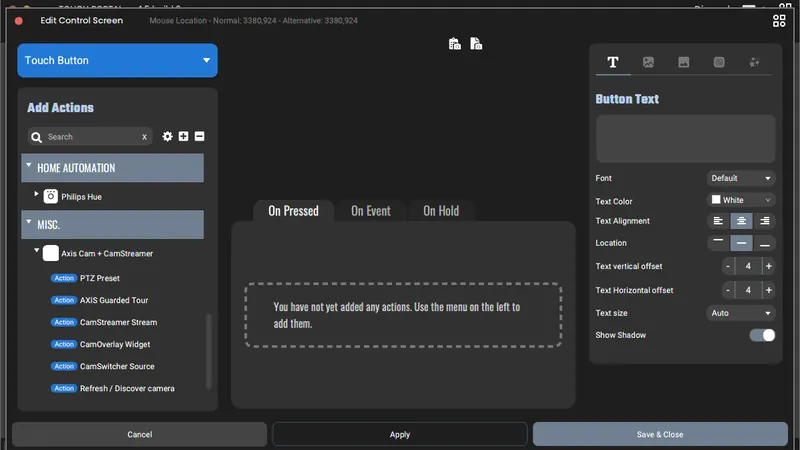
Screenshot of Stream Deck Axis Cam CamStreamer Plugin
Stream Deck plugin · TypeScript

Stream Deck ↔ Axis

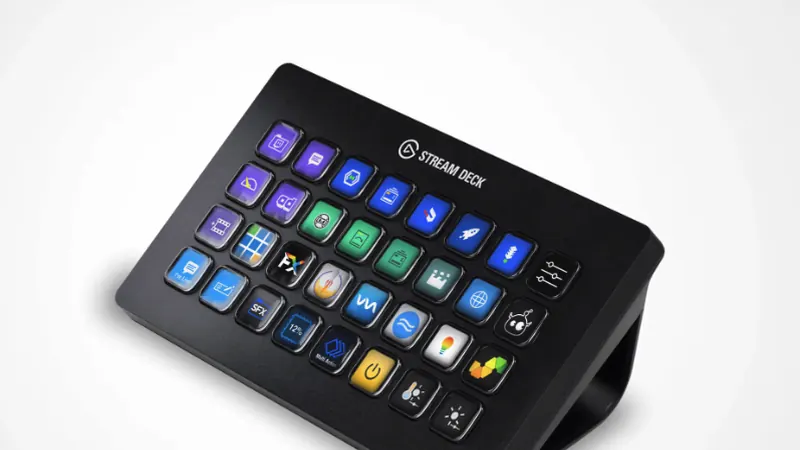
Native Elgato plugin talking straight to camera APIs over digest auth — PTZ presets, stream start/stop with live tally, CamOverlay widget toggles, CamSwitcher views, plus autofocus, defog, wiper and IR-cut. No proxy, no token.

ダイジェスト認証でカメラ API へ直接話しかける、Elgato ネイティブプラグイン。PTZ プリセット、タリー表示付きの配信開始/停止、CamOverlay ウィジェットの切り替え、CamSwitcher のビュー変更に加え、オートフォーカス、デフォグ、ワイパー、IR カットまで。プロキシもトークンも不要です。

Elgato SDKCamSwitcherPTZ
View repositoryリポジトリを見る
Screenshot of Bitfocus Buttons Module Axis Cameras and CamStreamer
Companion module · TypeScript

Bitfocus Companion Module

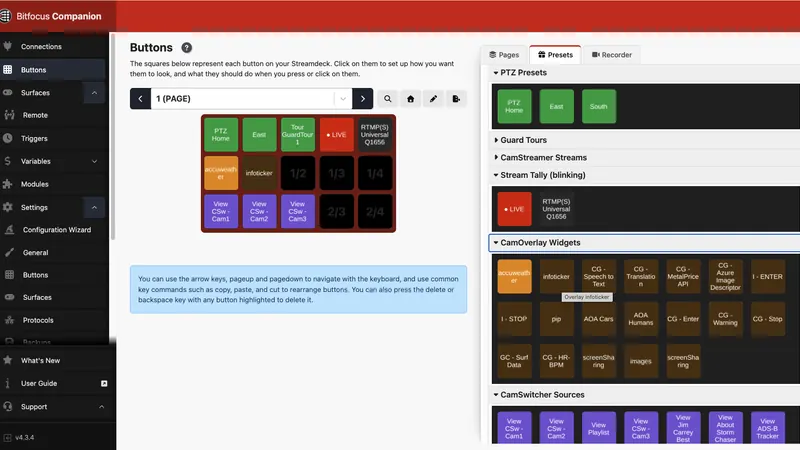
A native Bitfocus Companion module for Axis cameras and the CamStreamer suite — real dropdown actions populated from the device, rather than hand-rolled generic HTTP buttons.

Axis カメラと CamStreamer スイート向けの、Bitfocus Companion ネイティブモジュール。汎用 HTTP ボタンを手で組むのではなく、デバイスから取得した内容でドロップダウンが埋まる本来のアクションを提供します。

BitfocusBroadcastCamStreamer
View repositoryリポジトリを見る
Screenshot of Touch Portal Axis Cam PTZ CamStreamer Plugin
Touch Portal plugin · TypeScript

Touch Portal ↔ Axis

The Touch Portal sibling of the Stream Deck plugin: controls Axis cameras and CamStreamer apps directly over the LAN, from a phone or tablet acting as the control surface.

Stream Deck プラグインの Touch Portal 版。スマートフォンやタブレットを操作卓にして、LAN 経由で Axis カメラと CamStreamer アプリを直接コントロールします。

Touch PortalPTZLAN-only
View repositoryリポジトリを見る
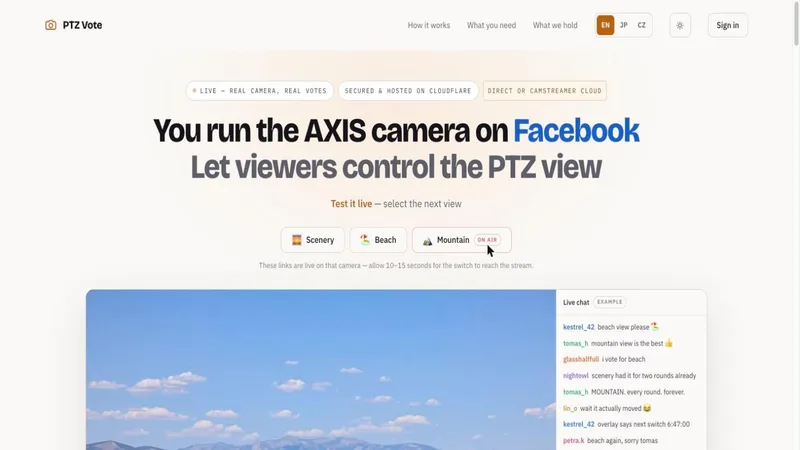
Screenshot of PTZ Vote — viewers voting for the next camera view live on stream
Cloudflare Workers · TypeScript

PTZ Vote

Turns stream chat into a camera operator. Viewers click a link to vote for the next PTZ preset or CamSwitcher view; clock-aligned rounds pick a winner and a CamOverlay line announces the switch live on stream.

配信のチャットをカメラ操作卓に変えます。視聴者がリンクをクリックして次の PTZ プリセットや CamSwitcher ビューに投票し、時計に揃えたラウンドで当選が決まると、CamOverlay の表示でライブに告知されます。

Cloudflare WorkersD1PTZCamSwitcher
Try it live試してみる
Screenshot of AXIS PTZ CamStreamerApps Chrome Extension
Chrome extension · JavaScript

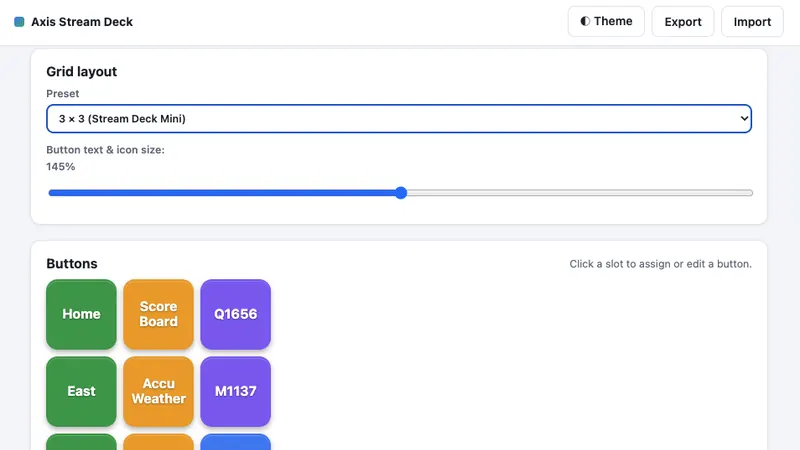
PTZ Button Grid (Chrome)

Turns the browser toolbar popup into a Stream Deck-style grid for Axis cameras. Each key fires a shortcut — PTZ preset, guard tour, CamStreamer, CamSwitcher or CamOverlay — with no hardware to buy.

ブラウザのツールバーのポップアップを、Axis カメラ用の Stream Deck 風グリッドに変えます。各キーが PTZ プリセット、ガードツアー、CamStreamer、CamSwitcher、CamOverlay のショートカットを実行します。専用ハードウェアは不要です。

Chrome MV3PTZGuard tours
View repositoryリポジトリを見る
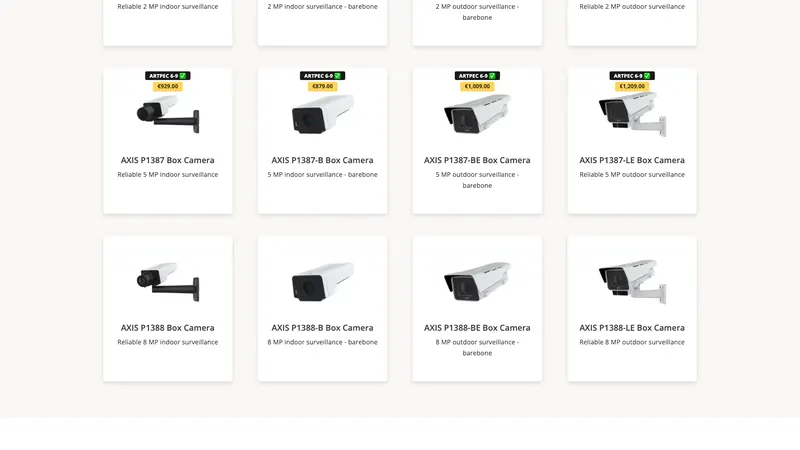
Screenshot of Axis MSRP Price Overlay Chrome Extension
Browser extension · JavaScript

Axis MSRP & FoV Overlay

Shows Axis MSRP list prices and chipset information directly on the Axis Product Selector and axis.com search results, with a favourites view and field-of-view filtering. Chrome and Firefox, seven languages.

Axis Product Selector と axis.com の検索結果に、Axis の MSRP 価格とチップセット情報を直接表示します。お気に入り表示と画角による絞り込みにも対応。Chrome と Firefox、7言語で利用できます。

ChromeFirefoxSales tooling
View repositoryリポジトリを見る
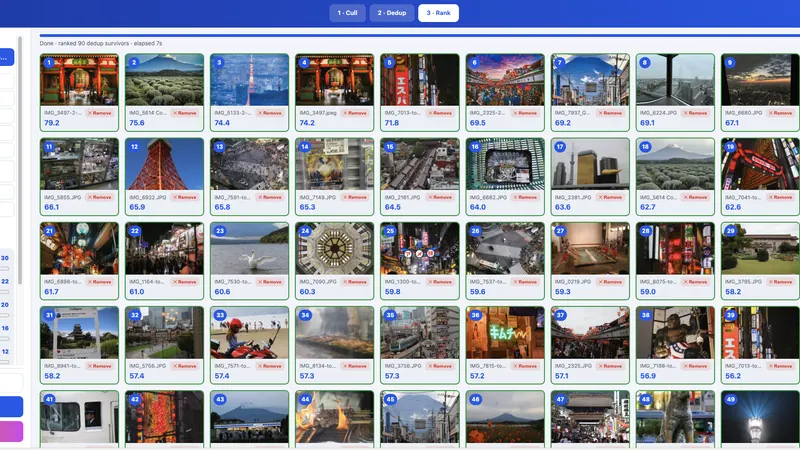
Screenshot of Photo Curator
Python · MIT★ 8

Photo Curator

Come home with 3,000 photos, leave with your 50 best. Culls blurry frames, collapses burst duplicates by perceptual hash, then ranks what's left on composition, light and focus. Runs entirely on your machine; RAW included.

3,000枚を持ち帰って、ベスト50枚だけを残す。ブレたコマを外し、知覚ハッシュで連写の重複をまとめ、残りを構図・光・ピントで採点します。処理はすべて手元のマシンで完結し、RAW にも対応します。

PythonrawpyORB
View repositoryリポジトリを見る
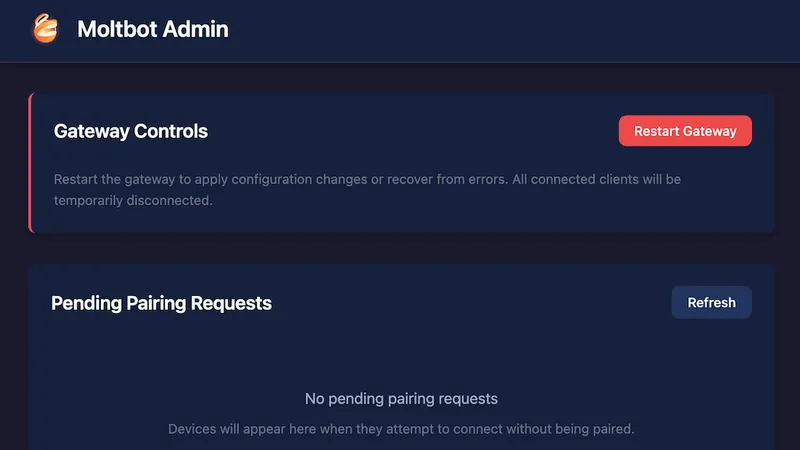
Moltbot Admin console showing gateway controls and pending pairing requests
TypeScript · Apache-2.0★ 1

moltworker

OpenClaw on Cloudflare Workers and Containers, hardened: a read-only health probe with no side effects, and a snapshot guard that refuses to archive an empty filesystem over your only backup.

OpenClaw を Cloudflare Workers と Containers 上で堅牢に動かします。副作用のない読み取り専用のヘルスチェックと、空のファイルシステムを唯一のバックアップに上書き保存させないスナップショットガードを備えます。

CloudflareDurable ObjectsR2
View repositoryリポジトリを見る
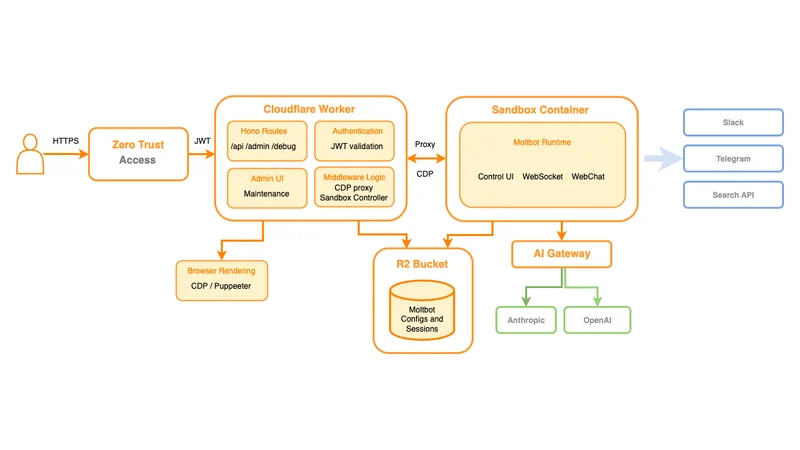
Architecture diagram: Zero Trust Access to a Cloudflare Worker, sandbox container, R2 bucket and AI gateway
JavaScript · DevOps

OpenClaw Cloudflare Ops

Supervised deploys, backups that refuse to save a degraded archive, one-command restore with per-file byte checks, and an offsite R2 mirror. Written after learning the hard way what a bad backup costs.

監視付きのデプロイ、壊れたアーカイブを保存しないバックアップ、ファイル単位でバイト検証するワンコマンド復元、そして R2 へのオフサイトミラー。ダメなバックアップの代償を身をもって知ったあとに書いたものです。

CloudflareDisaster recoveryBackups
View repositoryリポジトリを見る
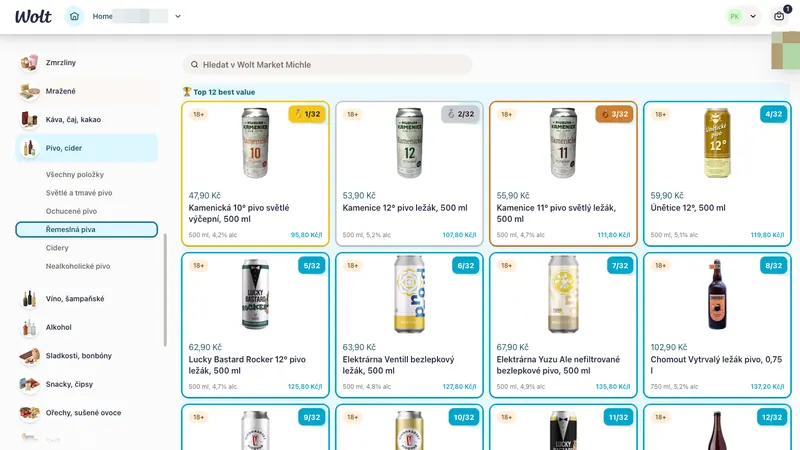
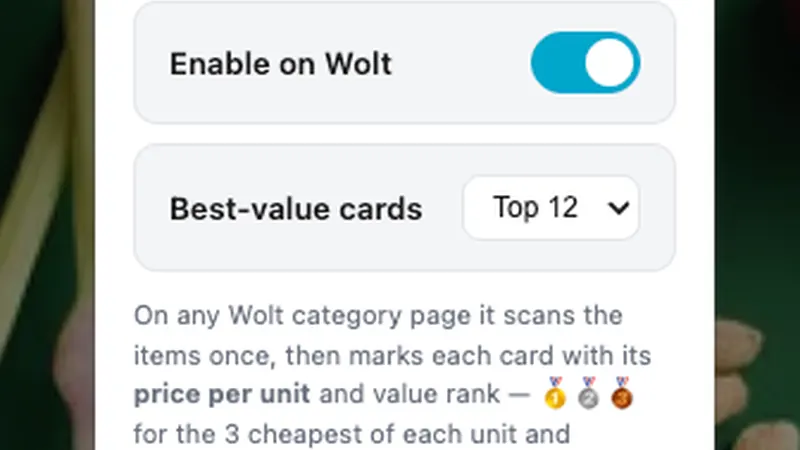
Screenshot of Value Rank for Wolt Chrome Extension
Chrome extension · JavaScript

Value Rank for Wolt

Scans a Wolt category page once and marks every card with its true price per unit and a value rank — medals for the three cheapest of each unit, position out of total for the rest.

Wolt のカテゴリーページを一度走査し、各カードに実際の単価とお得度ランクを表示します。単位ごとに安い上位3件へメダル、それ以外には全体順位を付けます。

Chrome MV3Price parsing
View repositoryリポジトリを見る
Screenshot of Value Rank for Wolt Firefox Extension
Firefox add-on · JavaScript

Value Rank for Wolt (Firefox)

The Firefox build of the same idea: the real price per unit on Wolt, shown instantly on the category page.

同じ仕組みの Firefox 版。Wolt の実際の単価を、カテゴリーページ上で即座に表示します。

FirefoxPrice parsing
View repositoryリポジトリを見る
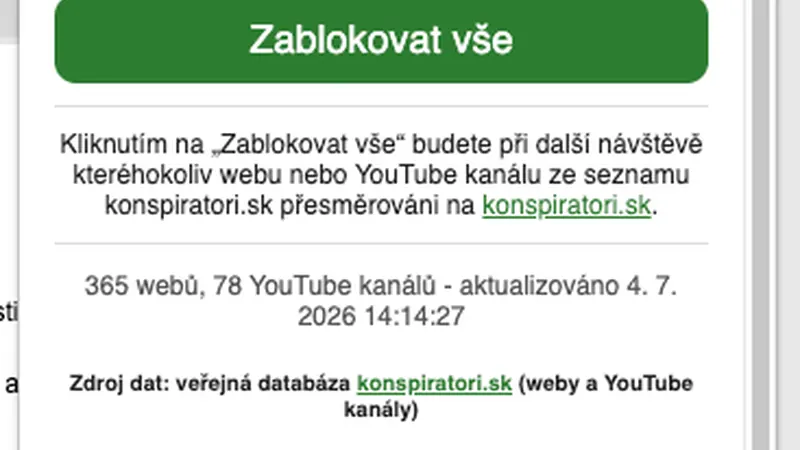
Screenshot of Fake Dezinfo Alert Blocker
Browser extension · JavaScript

Fake & Dezinfo Alert

Warns before you open a Czech disinformation site or YouTube channel, using the public konspiratori.sk database. Built for family members, kept public because plenty of people need it.

konspiratori.sk の公開データベースを使い、チェコの偽情報サイトや YouTube チャンネルを開く前に警告します。家族のためにつくり、必要としている人が多いので公開したままにしています。

Browser extensionkonspiratori.sk
View repositoryリポジトリを見る
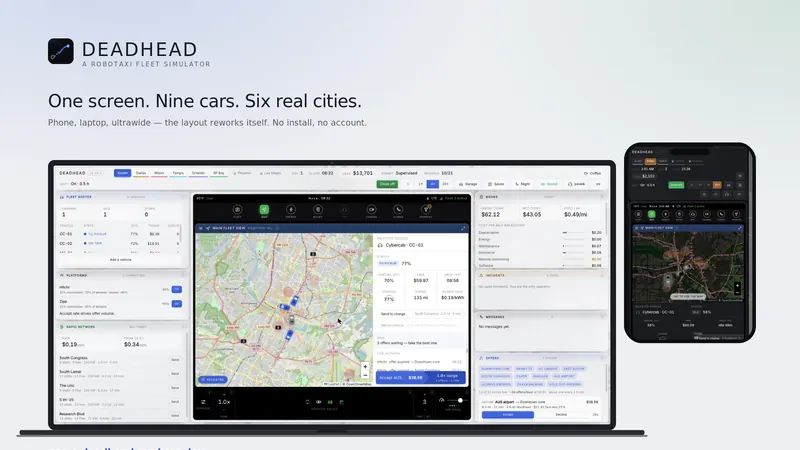
Screenshot of GAME Deadhead RoboTaxi Fleet Simulator
HTML · Game

Deadhead: RoboTaxi Fleet Sim

A future-job simulator played entirely through a car's centre-console screen. You never drive — you own and operate a small robotaxi fleet, and your job is the one that replaced driving.

車のセンターコンソール画面だけで進める、未来の仕事のシミュレーター。運転は一切しません。小さなロボタクシー車両群のオーナー兼運行者となり、運転に取って代わった側の仕事をします。

CanvasSimulationSide project
View repositoryリポジトリを見る

Stars and versions move — see the live list on GitHub →スター数やバージョンは変わります — GitHub で最新の一覧を見る →

04 / BACKGROUND04 / 背景

Who you'd be working with

一緒に進める相手について

I've spent the last seven-plus years of my career around AXIS network cameras — the products, the partner ecosystem and the integrators who have to make them work in the field. I'm Business Development Manager at CamStreamer, and I like the job: it puts me in front of the people actually trying to solve something, every week.

この7年あまり、AXIS ネットワークカメラを中心にキャリアを積んできました。製品、パートナーエコシステム、そして現場でそれを動かすインテグレーターたち。いまはCamStreamer のビジネス開発マネージャーで、この仕事が気に入っています。毎週、実際に何かを解決しようとしている人たちの前に立てるからです。

That's also where the projects come from. End users and resellers arrive with a requirement that has no product behind it yet — a scoreboard with no operator, a camera that has to appear in someone's Home app, an AI assistant that needs to see through a lens with no cloud in the path — and they can't tell whether it's feasible or fantasy. Building the answer beats speculating about it.

プロジェクトが生まれるのもそこからです。エンドユーザーやリセラーは、まだ製品が存在しない要件を持ってきます。オペレーターのいないスコアボード、Home アプリに出したいカメラ、クラウドを挟まずレンズ越しに見たい AI アシスタント。それが実現可能なのか絵空事なのか、本人たちにも判断できない。だったら推測するより、答えをつくったほうが早い。

I build them AI-assisted: Claude Code writes most of the code, I supply the domain judgement and the hardware to prove it on. I say that openly because it's the reason the list above exists at all — the ideas were never the bottleneck, the typing was. What comes out is a genuine proof of concept: enough to demonstrate, evaluate and decide with, and a solid starting point when something needs to become a real product.

つくり方はAI 支援です。コードの大半は Claude Code が書き、私は領域の判断と、それを検証する実機を用意します。これを公言しているのは、上の一覧が存在する理由そのものだからです。アイデアが足りなかったことは一度もなく、足りなかったのはタイピングでした。出てくるのは、言葉どおりの PoC です。デモして、評価して、判断するには十分で、製品化が必要になったときの出発点にもなります。

I work in English and Japanese, from Prague (CET). Engagements are usually scoped small and delivered fast — a proof of concept, a microapp, an integration — because that's how you find out early whether the idea survives contact with real hardware.

仕事は英語と日本語、プラハ(CET)から。案件はたいてい小さく区切って素早く出します。PoC、マイクロアプリ、連携ひとつ。そのほうが、アイデアが実機と出会って生き残るかどうかを早く確かめられるからです。

05 / PRACTICALITIES05 / 実務面

Questions people ask first

まず聞かれること

How fast can you show me something?どのくらいで見せてもらえますか

Usually days, not months. A focused proof of concept — one camera, one clear behaviour, running on real hardware — is typically a week or two of elapsed time. That speed is the point: you find out whether the idea holds while it's still cheap to change your mind about it.

たいていは数か月ではなく数日単位です。カメラ1台、動作ひとつに絞った PoC なら、実機で動くまで1〜2週間ほど。この速さこそが要点で、考えを変えるコストがまだ安いうちに、アイデアが成立するかどうかがわかります。

Is a proof of concept the same as a product?PoC は製品と同じものですか

No, and I won't pretend otherwise. A PoC proves the behaviour on real hardware and gives you something to demonstrate and evaluate. Hardening it — edge cases, long-run stability, install and update flow, support — is a separate and larger piece of work. Working out which of the two you actually need is often worth the call on its own.

違います。そこは正直に申し上げます。PoC は実機で動作を証明し、デモと評価に使えるものを提供します。堅牢化——例外ケース、長期稼働の安定性、インストールと更新の導線、サポート——は、別のもっと大きな仕事です。そのどちらが本当に必要なのかを整理するだけでも、一度話す価値はあります。

What happens after the prototype?プロトタイプのあとはどうなりますか

Whatever suits the project. Some prototypes are all anyone needed: a demo that wins the argument, or a script that quietly keeps running. Others should become properly developed products, and for CamStreamer-ecosystem work that's a conversation to have with the CamStreamer team rather than with me alone. Either way you leave with something that runs, not a slide.

案件次第です。プロトタイプだけで十分なこともあります。議論に決着をつけるデモや、静かに動き続けるスクリプトなど。きちんと製品化すべきものもあり、CamStreamer エコシステムの案件であれば、私だけでなく CamStreamer のチームと話す内容になります。いずれにせよ、手元に残るのはスライドではなく、動くものです。

Do you write all the code yourself?コードはすべて自分で書いていますか

No, and I'd rather say so up front: I build AI-assisted, and Claude Code writes most of the lines. What I contribute is the judgement — which VAPIX call, which ACAP boundary, what the DLPU will actually sustain, and whether the idea is worth building at all — then everything gets installed on real cameras and fixed until it holds. If you want a hand-written purist codebase, I'm not your developer. If you want to find out quickly whether something is possible, from someone who knows the platform well enough to catch what a model gets confidently wrong, that's exactly what this is.

いいえ。先にお伝えしておきます。私は AI 支援で開発しており、行数の大半は Claude Code が書いています。私が担うのは判断です。どの VAPIX 呼び出しを使うか、ACAP のどこで線を引くか、DLPU が実際にどこまで耐えるか、そもそもつくる価値があるか。そのうえで、すべてを実機のカメラに入れて、動くまで直します。すべて手書きのコードベースをお求めなら、私は適任ではありません。プラットフォームを理解した人間の目で、モデルが自信満々に間違える箇所を潰しながら、実現可能かどうかを素早く確かめたいのであれば、まさにこれが向いています。

Do you work remotely, and in which languages?リモートですか。対応言語は

Remote by default, from Prague (CET). Projects run in English or Japanese. Most of the development, testing and debugging happens against cameras I can reach over the network or in my own lab — on-site time is usually only needed for commissioning or for hardware I can't replicate.

基本はリモートで、拠点はプラハ(CET)です。案件は英語または日本語で進めます。開発・テスト・デバッグの大半は、ネットワーク越しに触れるカメラか自分のラボの機材で行います。現地作業が必要になるのは、通常はコミッショニングか、手元で再現できないハードウェアがある場合だけです。

Which cameras and firmware do you target?対応するカメラとファームウェアは

AXIS OS 11 and 12 on ARTPEC-7, -8 and -9. Native apps are built with the ACAP Native SDK, typically bundling a Node.js runtime and a web settings UI. Lighter jobs run as CamScripter microapps on top of the CamStreamer suite, which is faster to deploy and easier for your team to maintain afterwards.

ARTPEC-7 / -8 / -9 上の AXIS OS 11 および 12 です。ネイティブアプリは ACAP Native SDK で構築し、通常は Node.js ランタイムと Web 設定 UI を同梱します。軽い案件は CamStreamer スイート上の CamScripter マイクロアプリとして動かします。こちらのほうが導入が速く、後からチームで保守するのも簡単です。

Can this run without a cloud service?クラウドなしで動きますか

Yes, and that's usually the point. Everything in the projects above runs on the device itself — no relay, no broker you have to host, no data leaving the network unless you want it to. Where cloud access genuinely helps, CamStreamer's device-connect layer is an option rather than a dependency.

はい。むしろそこが要点であることがほとんどです。上のプロジェクトはすべてデバイス上で動作します。中継サーバーも、自前で立てるブローカーも不要で、望まない限りデータがネットワークの外に出ることもありません。クラウドが本当に役立つ場面では、CamStreamer の device-connect を依存先ではなく選択肢として使えます。

Got an Axis idea — or a problem to solve?

Axis で実現したいこと、困っていることはありませんか

Bring me either one — I like both. Half an hour is usually enough to tell you whether it's buildable, what a prototype would need to prove, and whether it's worth building at all.

どちらでも歓迎です。30分あれば、つくれるかどうか、プロトタイプで何を検証すべきか、そもそもつくる価値があるかまで、だいたいお話しできます。